The most common mistake when you start structuring a reference library: starting with forty fields “just in case.” Six months later, the form is endless, the completion rate collapses, and thirty of the forty fields are empty in most records.
The opposite works better. Start with a minimum model — twelve fields are enough in most professional services firms — and add only when a concrete use justifies it. This article describes that minimum model, how to organize it into three families, how to set distribution levels from the start, and how to resist the temptation to add.
Why twelve fields and not thirty
The urge to add fields comes from an intuitive line of reasoning: the more information you capture, the more the library serves. That’s wrong. The more information you ask for, the less you actually capture — because the entry burden grows faster than the use.
The mechanics observed across most projects:
- With 12 fields, the completion rate approaches 90% after six months of upkeep
- With 25 fields, it drops to 60%
- With 40 fields, it falls below 35% — and many records stay “draft,” never published
The effect on trust in the library is immediate. Reps and marketing no longer know whether a record is up to date, complete, or approved. Distrust sets in, use drops, and the tool drifts toward abandonment. The short model beats the complete model for a simple reason: it’s kept up to date, and trust takes hold.
Three principles guide the right sizing:
The model serves the identified uses, not every imaginable use. If your priority use cases are the targeted proposal and the large-account vendor listing, the model must feed those two perfectly before adding material for marketing content or onboarding.
Every field you add must be able to name a concrete use. Not “it would be nice to have.” Not “in case a buyer asks.” A real use, with an estimable volume, and an identified owner to fill it.
The model is revised every twelve to eighteen months, no more often. Revising too frequently tires users and signals that no one has a clear vision of what the library is meant to serve.
Three field families
A well-structured model breaks down into three families of information. Distinguishing these families from the start avoids uniform records where everything is treated with the same level of importance.
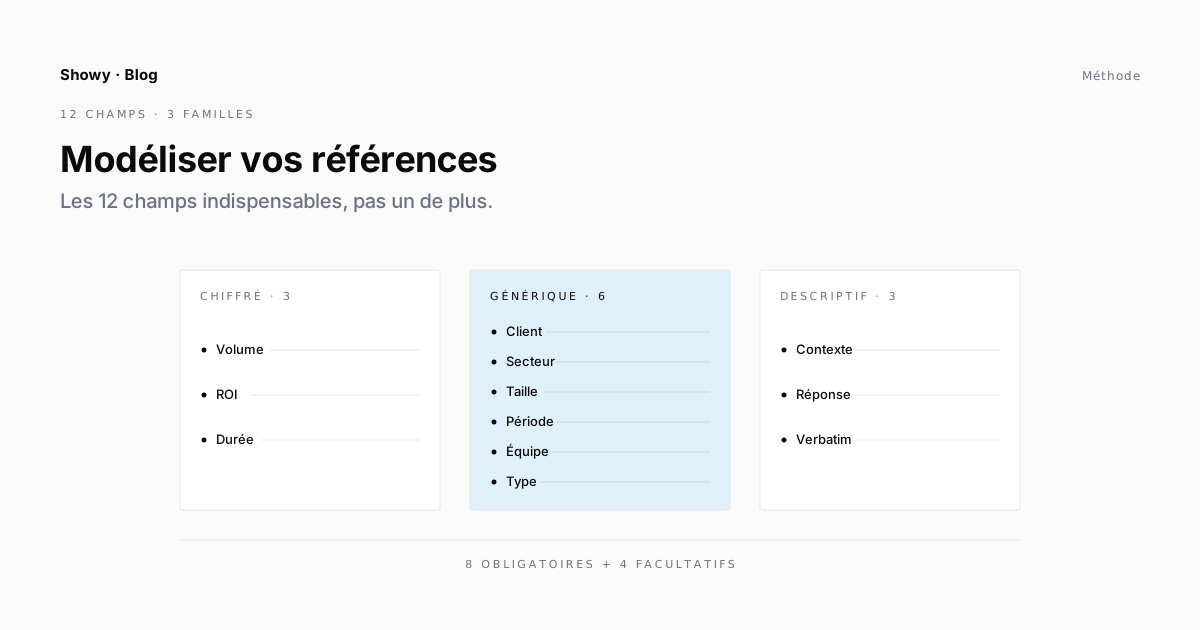
Generic fields identify the project and its context. Client name, industry, company size, engagement type, period, team. These are structured data, with limited choices (drop-downs most of the time). They’re used to filter, search, and classify. Without these fields, your library isn’t queryable.
Quantified fields capture what can be measured. Volume processed, productivity gain, KPI improvement rate, project duration. These are the data that make the case in a proposal and a case study. Caution: not every quantified field is shareable.
Descriptive fields carry the narrative. Client context, the challenge to solve, the method applied, a quote. These are text fields of defined length (300 words for context, 500 words for the response, for example). Without a length constraint, they drift — either cut to the extreme or endless.
These three families have their own entry regime. Generic fields are filled at signature. Quantified ones are collected at delivery or after. Descriptive ones require dedicated writing work, which falls outside the project lead’s agenda. That’s why mixing all three in a single form dooms completion: you’re asking for three different efforts at three different moments, as if they were one.
The twelve essential fields
Here is the minimal list that covers most uses in a professional services firm. The detail varies by trade, but the structure holds 80% of the time.
| # | Field | Family | Distribution |
|---|---|---|---|
| 1 | Client name (with anonymized variant) | Generic | Varies by consent |
| 2 | Industry | Generic | Public |
| 3 | Client size (revenue or headcount) | Generic | Proposal + public |
| 4 | Engagement type (advisory / delivery / time-and-materials / fixed-price) | Generic | Public |
| 5 | Period (start, end) | Generic | Public |
| 6 | Team (size, profiles) | Generic | Public |
| 7 | Client context and challenge (300 words max) | Descriptive | Varies |
| 8 | Response delivered (500 words max) | Descriptive | Varies |
| 9 | Technologies and methodologies used | Generic | Public |
| 10 | Quantified results (3-5 KPIs) | Quantified | Varies by consent |
| 11 | Client quote (short attributed quote) | Descriptive | Varies by consent |
| 12 | Distribution status + client reference contact | Meta | Internal |
These twelve fields feed the four recurring use cases of a reference:
- The targeted proposal relies mainly on fields 1, 2, 4, 6, 9, and 10
- The large-account vendor listing requires 1, 4, 5, 6, 9, 10
- Marketing content draws on 7, 8, 10, 11
- Internal onboarding skims all fields
No use case needs more fields than these to work properly. The extra fields you might be tempted to add (client NPS, executive sponsor, applicable certifications, subcontractors involved) serve only an occasional use — and weigh down the form for the twenty other daily uses.
Distribution levels: the critical distinction
Of the twelve fields, several carry information whose distribution must be set from the start. This distinction isn’t added later — it’s modeled at the outset, because it conditions everything else: access rights, document generators, the collection of client consents.
Three levels are enough in most cases.
Internal only. The exact project amount, the margin made, the difficulties experienced on the team side, the real technical trade-offs. This data stays in the library, accessible to the reference owners and the executive committee. It never goes out.
Shareable in a confidential proposal. The client name, the order of magnitude of the program, the general methodology, the KPIs allowed under a client framework agreement. This data goes out in proposals subject to a non-disclosure clause.
Public. What the client has explicitly agreed to see published — an online case study, a LinkedIn post, an industry page. This almost always requires a dedicated written consent.
Labeling each field with one of these three levels at modeling time avoids weeks of legal discussion at production time. You don’t ask “can we publish this?” for every deliverable — you know it by reading the record.
Mandatory vs optional: the 80/20 rule
Of these twelve fields, half should be mandatory — without them, the record can’t be considered “publishable.” The other half is optional — it enriches the record but doesn’t prevent its use.
Mandatory (8 fields): client name, industry, engagement type, period, team, context and challenge, technologies, distribution status. Without these eight filled in, the record stays a draft. With them, it automatically switches to “internally publishable.”
Optional (4 fields): client size (often available, but not always for private clients), detailed response delivered (can come later), quantified results (often available only six months after delivery), client quote (requires a dedicated collection effort).
This distinction has a very concrete function: it’s what drives the reference’s status in the library. The status is no longer a label set by hand by the owner — it’s a mechanical consequence of how the record is filled in. This automation removes much of the friction in everyday use.
Three rules to avoid the catch-all model
Start with fewer fields than you think you need. Twelve or thirteen max. Add a field only when a concrete use justifies it — not when a middle manager suggests it “would be nice to have.”
Test the model on five real projects before industrializing. Take five projects from the last two years, fill in the twelve fields, observe what’s really missing. Often nothing. When something is missing, you’ll know exactly why.
Revise the model every twelve to eighteen months, no more often. A revision = possibly adding one or two fields, possibly removing a field that’s filled nowhere. A model that lasts two years without major change is a good model. A model revised every three months serves no one.
→ The full method, from choosing use cases to smart distribution, is in the Showy white paper. Six steps you can apply separately, designed to reinforce each other.
FAQ
Why 12 fields and not 10 or 15?
Twelve is a balance point observed across dozens of well-kept libraries. Ten fields let too much useful information slip through (notably the quote and the distribution status). Fifteen fields needlessly weigh down entry without a proportional use benefit. The right model for your firm might be 11 or 13 — the key is to stay under the symbolic line of 15.
Do you need a “ROI” or “financial gain” field?
Not as a mandatory one. Financial gain isn’t always available, is rarely quantifiable before six to twelve months after delivery, and is often confidential. Better a free “Quantified results” field that holds three to five KPIs suited to the project, rather than a standardized ROI field that will stay empty.
Should the client reference contact be visible to everyone?
No. This field is strictly internal. It serves the rep who wants to request public-distribution consent, or the CSM who wants to follow up with the client for a renewal. Sharing it openly would needlessly expose the client to solicitation.
What do you do with older, poorly modeled references?
Two options. Either progressive migration: each time an old reference is reused in a proposal, the rep fills in the missing fields. The library updates itself over several months with no dedicated effort. Or bulk migration: a cleanup project over two to four weeks, usually led by sales operations. Choose based on your one-off capacity.
How do you handle very different engagements (fixed-price vs time-and-materials vs license)?
With a drop-down “Engagement type” field. The model stays the same, but some fields take on a different meaning by type. The period of a long-running time-and-materials engagement doesn’t have the same status as the period of a short fixed-price one. Documenting these nuances in a memo accessible from the form avoids ambiguity.