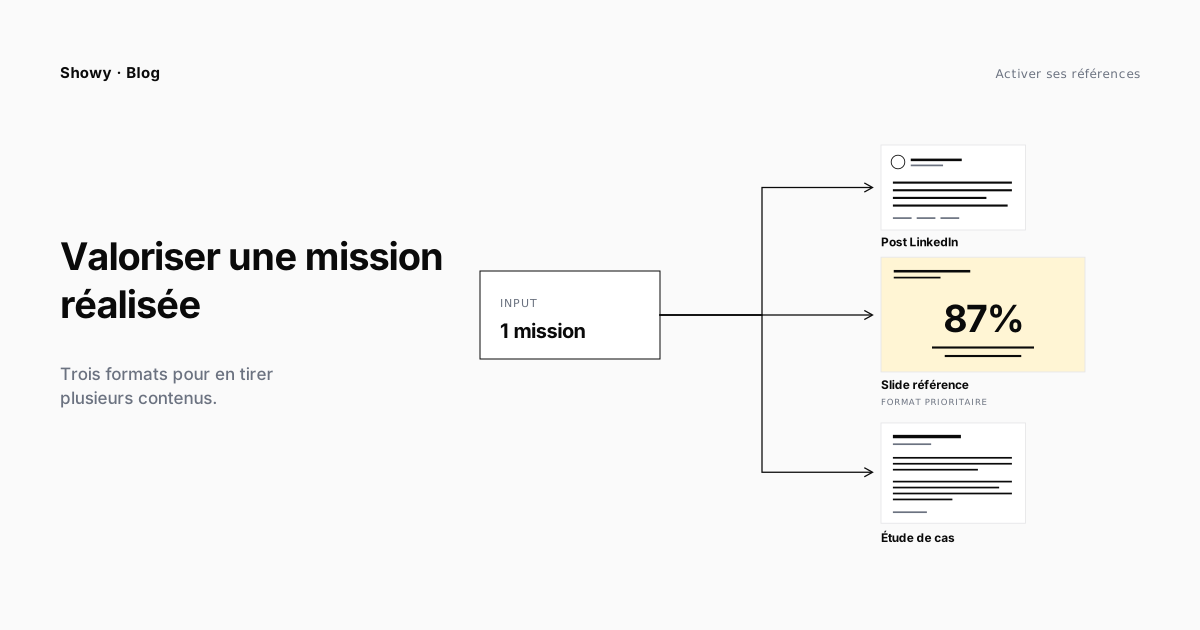
A finished project is raw material. Used well, it feeds several pieces of content for months. Used badly, it ends up a slide forgotten in a shared folder. The difference between the two isn’t writing talent — it’s the repurposing method.
This article describes three formats you can produce from a single project: a LinkedIn post, a reference slide, a case study. For each, it details the sales function, the typical structure, a plain example, and the common pitfalls. At the end, it shows how to sequence them across a sales cycle.
Why repurpose one project into several formats?
Three simple reasons.
The same project doesn’t serve the same use at each stage of the cycle. A prospect who discovers your firm on LinkedIn doesn’t read the case study — they scan a promise in five seconds. The same prospect, six months later in a proposal review, won’t settle for a generic slide — they want the full context. A single format doesn’t cover both moments.
You recoup the initial investigation effort across several deliverables. Gathering a project’s information — interviewing the project lead, finding the figures, getting client consent — takes several hours. It’s a waste to get only one slide out of it. With upstream structuring, the same base feeds all three formats.
You gain message consistency. When marketing, sales, and delivery all start from the same material, the outward message is aligned. Otherwise, each channel tells a slightly different version — and the version a prospect sees on the third touch contradicts the one seen on the first.
One material, three angles
Before diving into the formats, hold on to the logic. A project is a set of facts. The three formats take those same facts from three different angles:
| Format | Dominant angle | Sales function |
|---|---|---|
| LinkedIn post | Short narrative | Catch attention at the top of the funnel |
| Reference slide | Visual summary | Convince in proposals and vendor listings |
| Case study | Detailed demonstration | Go deeper before the decision |
The goal is never to tell “what we did.” The goal is to help the reader picture themselves in the result. The three formats don’t differ in their content — they differ in the depth they offer for that projection.
Format 1 — The LinkedIn post
When to use it. At project delivery, on a striking result, or when a full case study comes out. A social format, read in under a minute, easy to share.
Typical four-beat structure.
- The hook: a concrete situation or a salient figure in the first line. Not a rhetorical question, not a provocation. A fact.
- The context: in two or three sentences, the client’s challenge. Without naming the client if consent isn’t given — “a European retail player,” “a mutual bank” is enough.
- The action: the key decision, the method, what makes the difference versus the usual approach. One sentence, two at most.
- The result: one or two concrete, measurable figures. Not “a success” or “benefits” — figures.
Plain example.
A European retail player wanted to halve the processing time on its product returns.
The existing system split the information across three different tools and forced agents to re-enter every case by hand.
We consolidated the three flows into a single workflow, with automatic rules on 80% of return reasons.
Result: average processing time down from 11 to 4 minutes, in eight weeks.
(Project delivered in September, client consent for publication obtained.)
Pitfalls to avoid.
- Hashtag stuffing (
#DigitalTransformation #Innovation #SuccessStory). One relevant hashtag is enough. - Self-glorification (“we’re proud to have supported…”). You’re telling the client’s story, not yours.
- The unquantified result. Without a figure, the post becomes an ad — and no one shares an ad.
Format 2 — The reference slide
When to use it. As an appendix to a proposal, in a large-account vendor-listing file, on your site’s “Our references” page, as support in a meeting.
Typical six-block structure.
- Identification: client name (or anonymized description), logo, industry, size.
- Context: in two sentences, the initial situation. No filler, the problem.
- Intervention: what your firm did. One sentence of expertise, one of method.
- Results: two to four key figures, in large type. Clear visual hierarchy — one dominant figure, the others in support.
- Metadata: project duration, team size, technologies or methodologies used. This data says “we’re at your scale.”
- Visual or quote: a minimal infographic, a screenshot, or a short, concrete client quote.
Plain example.
European retail player — Product-return journey redesign
Context — 280,000 returns processed a year, scattered across three tools. Agents re-entered every case by hand.
Intervention — Unified workflow, automatic rules on recurring reasons, integration with the existing CRM.
Results — Average processing time: 11 min → 4 min. Automation rate: 0% → 80%. Customer-service NPS: +18 points.
Metadata — 8 weeks · team of 4 (1 PM, 2 dev, 1 UX) · Salesforce, n8n
Quote — “Customer service handles three times as many cases with the same team.”
Pitfalls to avoid.
- The slide that looks like a résumé: too many logos, not enough figures. The “Our clients” page is for logos; the reference record is for proof.
- A client quote that’s too long or too generic (“an attentive team”). A short, factual quote (“we handle three times as many cases”) is worth ten superlatives.
- The absence of metadata (duration, team size, technology). That’s what lets the prospect recognize themselves.
Format 3 — The case study
When to use it. As downloadable content on your site, in a follow-up after a first meeting, in the final file of a consultation. A long format, read in 3 to 5 minutes, for a reader in active evaluation.
Typical five-section structure.
-
Context and stakes — Presenting the client (industry, size, organization), the challenge to solve, and the underlying business stakes. It’s the longest section: the reader must understand the initial situation as if they were there.
-
Why this project wasn’t obvious — An optional but powerful section. The constraints, the pitfalls, what nearly went wrong. This is what separates a living case study from a brochure.
-
Approach and method — How you went about it. Key steps, technical or methodological choices, who did what. Not an exhaustive checklist — the three or four structuring decisions.
-
Results — Before/after figures, on the KPIs that matter to the client’s business. A graphic visualization beats a table.
-
Lessons — What you take from the project and would apply elsewhere. This section turns a happy client into proof of reproducible expertise.
Pitfalls to avoid.
- The hagiographic tone. If everything went perfectly, the reader doesn’t believe it. Mention at least one difficulty resolved.
- Forgetting the client quote. A case study without the client’s voice is an internal brochure.
- The decorative visual. Each diagram must carry information, not decorate. Otherwise, delete it.
- The generic call-to-action at the end (“Have a similar project?”). Prefer a factual CTA: “See more cases in retail” or “Book 30 minutes to discuss your case.”
How to sequence the three across a sales cycle
The three formats don’t substitute for each other. They relay one another over time.
Discovery phase. The LinkedIn post does its job — it puts your name in front of a prospect who doesn’t know you, or refreshes your presence in the mind of a prospect who follows you without engaging.
Qualification phase. When the prospect returns to your site, they check the “Our references” page. The reference slide plays its filter role: yes or no, has your firm already solved a problem like mine, in an industry like mine?
Proposal phase. In the proposal, the reference slide is attached. It proves without pushing. It leaves the rep time to talk about the client’s subject, not to recount their own exploits.
Evaluation phase. At this stage, the prospect wants to understand how it really went. The downloadable case study is the tool for this phase. It says: “here’s what we learned, here’s what you can expect.”
A good practice: at each project’s delivery, decide which will be the dominant format. Not every project becomes a case study — that’s a significant editorial effort. But every project can become a reference slide and a LinkedIn post as soon as client consent is obtained.
FAQ
How long does it take to produce the three formats from one project?
If the project is properly documented at delivery (facts, figures, client quote collected), count one hour for a LinkedIn post, two to three hours for a reference slide in your template, and a day for a long-format case study. Without initial documentation, multiply by three — it’s the after-the-fact investigation that takes time, not the writing.
Do you need client consent for each of the three formats?
For the LinkedIn post and the downloadable case study: yes, ideally in writing, specifying what can be named (client, figures, technologies) and what must stay anonymous. For the reference slide in a confidential proposal: it depends on the original contract. Some framework agreements explicitly allow being cited as a reference; others forbid it.
Which format should you produce first?
The reference slide. It’s the most useful day to day, the one reps need every week. The LinkedIn post can follow in the days after delivery. The case study is produced later, once you have three to six months of hindsight on the results.
How many case studies should a professional services firm have?
Ten excellent case studies, each on a distinct case (industry, client size, type of engagement), beat fifty cobbled-together ones. The rule of thumb: one case study per key intersection (industry × engagement) you want to win. If you sell three engagements across four industries, aim for about ten complete studies.
How do you know whether a case study works?
Three signals: reps cite it as “the one that helps them,” it’s downloaded from your site (the lead magnet confirms it), and it comes up spontaneously in prospect conversations (“we saw your study on X, interesting”). If none of the three happens, the study misses its target.